Create with Mark / Free skill + prompt
Build your game from anywhere
A free skill and prompt that turn any large build into a live website. See what Claude is working on, browse everything in your game, and send notes from your phone that go straight into the build queue.
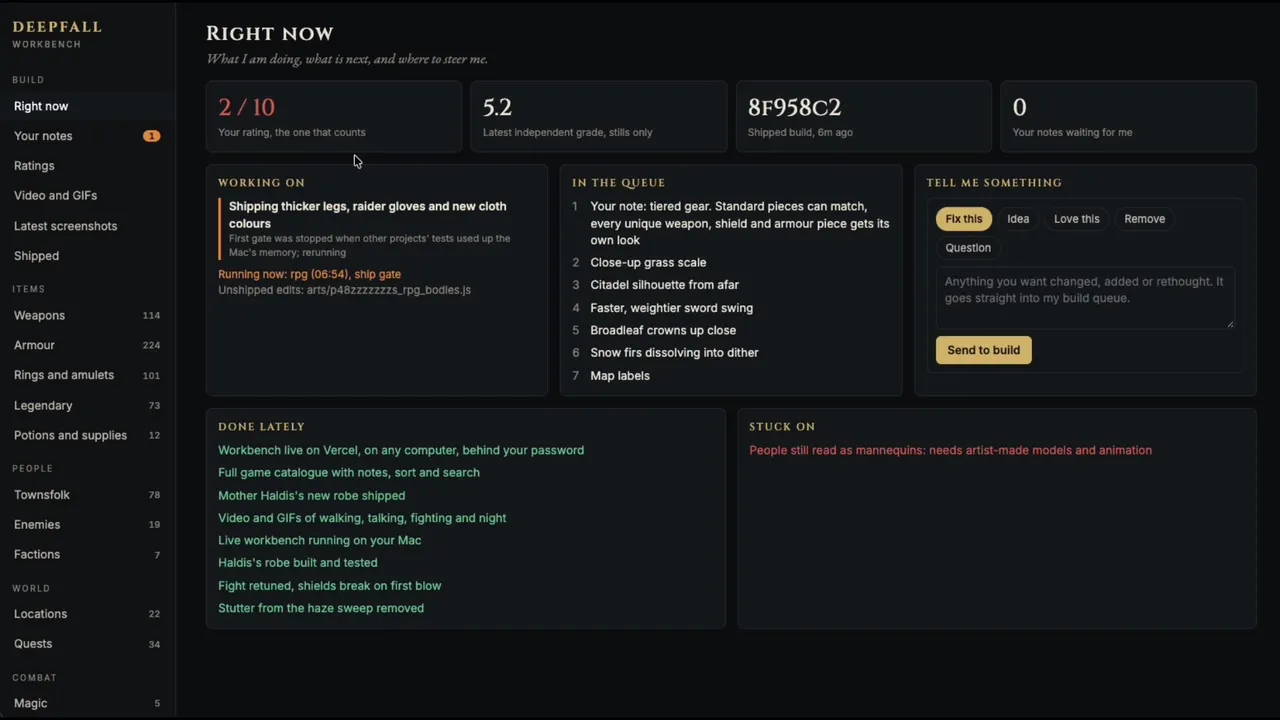
Deepfall workbenchFrom my current build
Watch the walkthrough
The Missing Piece in My AI Game Workflow (Free Skill)
I walk through the workbench in this video: what it is, why I use it and how it fits my builds. Watch it first, then use the page to set up your own.
Watch on YouTube
Your build,
on one page.
My builds run on a machine in another room. The workbench lets me check on them and steer them from my office, the gym, or outside with my kids. As long as I can open the URL, I can talk to the agents doing the work.
The whole build at a glance
See what’s being worked on, what’s in the queue, what’s finished and what’s stuck. Then tell it to fix something, try an idea, remove something, or just ask a question.
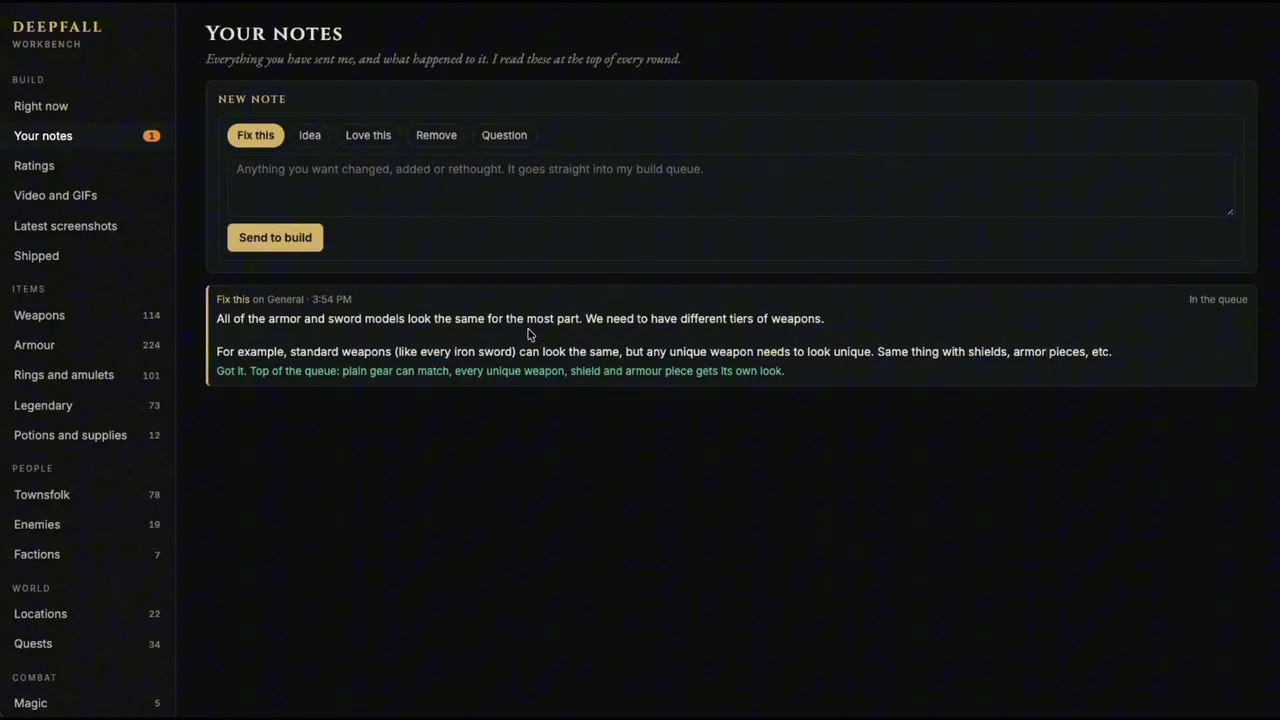
Notes that get answered
I told it the armor and swords all looked the same. That reply came from my other machine, and the note went straight into the queue.
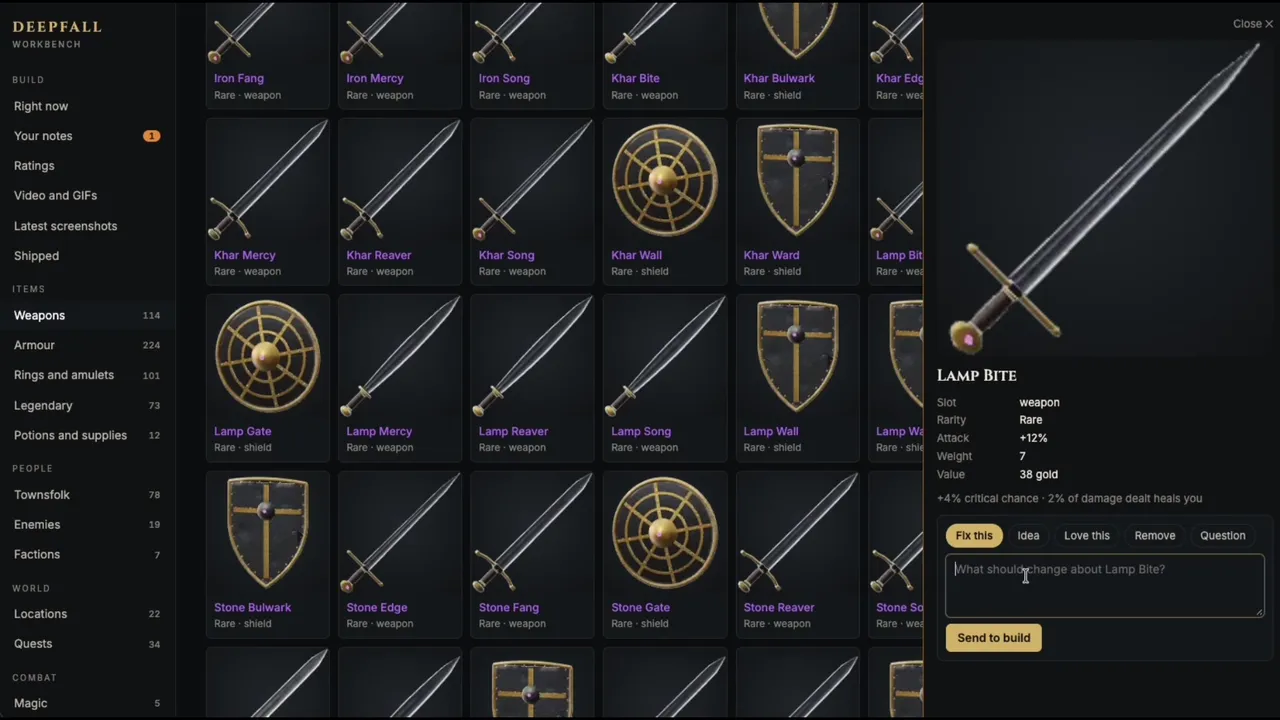
Everything in your game, by tab
Weapons, armor, potions and anything else your game has, with search, sort and filters. Open any item and leave a note on that exact item.
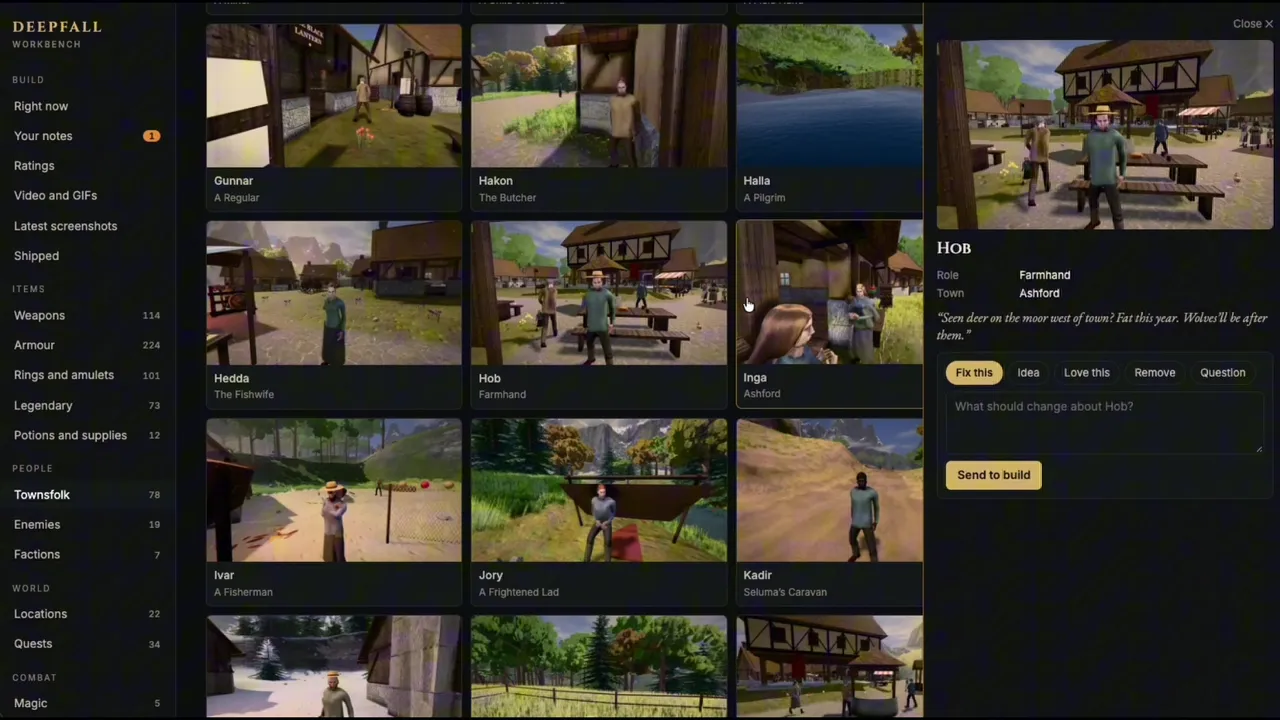
Feedback as broad or specific as you want
Characters, places, quests and skills all get the same treatment. Say “enhance the graphics across the board” or “let’s give Hob different clothes.”
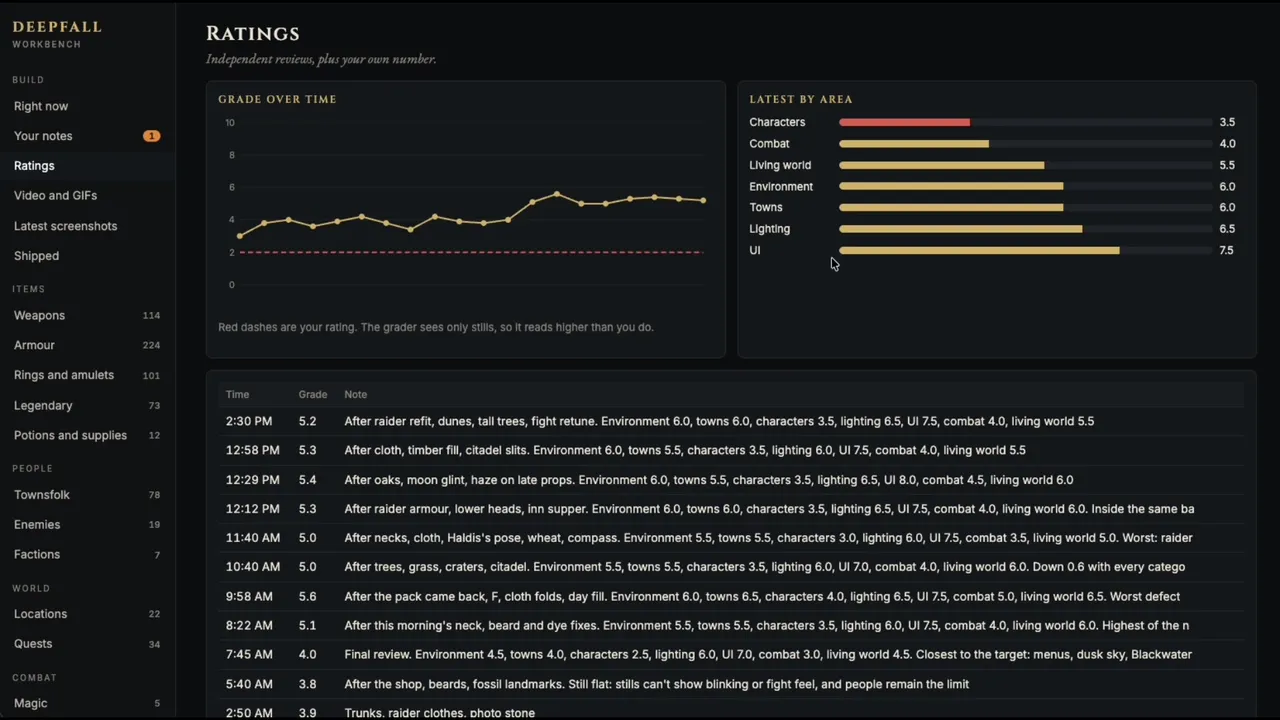
Independent ratings
Separate review agents score each area of the game, so you can see whether the build is really getting better.
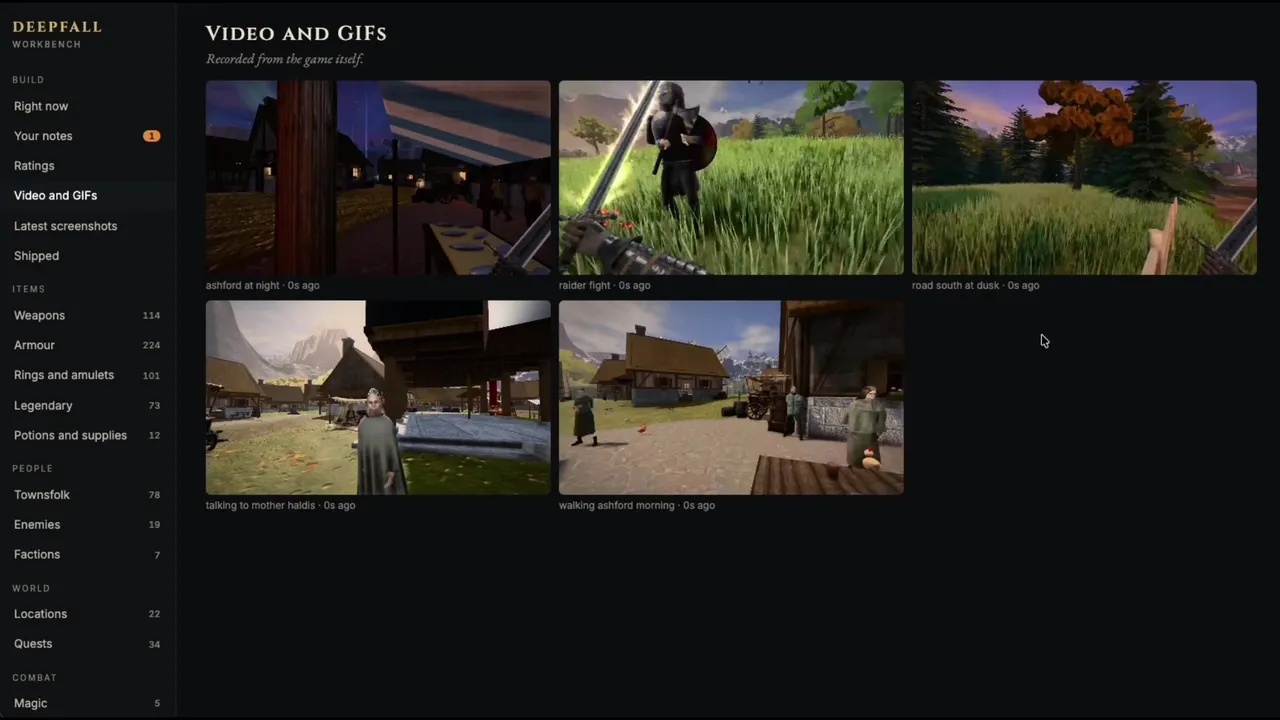
Fresh clips and screenshots
New videos, GIFs and screenshots land here as the build runs. You can request specific shots and leave feedback on any of them.
Made for big builds. I don’t do this for every game. Anything that’s going to take multiple weeks or months, I’m absolutely running this way.
Two ways
to get one.
Use the skill if you want the workbench I use, ready to fill with your game. Use the prompt if you’d rather have Claude generate its own from scratch.
The finished site
Includes the page, the local server, hosting scripts and the instructions Claude follows. Use the skill ↓
Generate your own
One prompt, nothing to download. Claude builds the site for your game, and the result will vary. Use the prompt ↓
Download it.
Run it.
First time using Claude Code? Follow Anthropic’s setup guide to install it and sign in. New to skills? My beginner guide walks through it.
- 01
Install it
Paste the prompt below into Claude Code with your download’s location. Or unzip it yourself so the folder sits at
~/.claude/skills/game-workbench, then start a new session. - 02
Run it on your game
Open Claude Code in your game’s folder and say the line below. Claude studies your game, builds a tab for everything in it, pulls real pictures from the game and opens the page.
- 03
Keep it live
Tell Claude to keep the workbench current. Your notes then outrank its plan.
Install the skill in the ZIP I provided for my personal use in Claude Code, so it sits at ~/.claude/skills/game-workbench. Keep SKILL.md and all its supporting files together. Tell me when it is ready and whether anything else is needed.
Include your downloaded file’s location with this prompt.
Run our workbench skill
Keep the workbench current as you work. Read my notes at the start of each round, move them to the top of the queue, and reply on each note when the work is done.
Or generate
your own.
Open Claude Code in your game’s folder, then paste this in. Change anything you like. It’s your workbench.
Build a live workbench website for the game in this folder. It's one page where I can watch the build and give you feedback on anything in the game.

First, study the game. Read its code and data, and list everything it really contains: items, characters, enemies, places, quests, skills, levels. Work out how to run it, and read any existing test or capture scripts.

Build the site in a `workbench/` folder, with a small local server that needs nothing installed beyond Python 3. Match the look of the game's own menus. It needs these tabs:

- Right Now: what you're working on, what's queued, what's done, what's stuck, and a box where I can send you a note marked Fix this, Idea, Love this, Remove or Question.
- Your Notes: every note I've sent, its status and your reply.
- Ratings: scores over time from independent reviews.
- Video and GIFs, and Latest Screenshots: new ones appear as you make them.
- Shipped: the recent changes from git, plus anything not committed yet.
- One tab for every kind of thing in the game, with search, sort and filters. Clicking anything opens a drawer with its details and a note box for that exact thing. Tell me which kinds you chose and any you left out.

Use real data and real pictures. Pull the data from the game's own tables and capture pictures from the running game. The game's own icons and portraits count. Run the game headless and muted when you capture it. Don't invent entries or draw placeholder art. If something can't be captured, or there are too many to capture, get a good set, mark the rest as not captured and tell me. Look at a sample of the pictures yourself, because automated checks miss black frames and empty shots.

Keep everything in plain JSON files you can read and write as you build. The page should refresh every few seconds without losing my clicks or what I'm typing.

From now on, this is part of how you work:

- At the start of every round, read my notes. Mark new ones as seen and put them at the top of the queue. My notes outrank your plan.
- Update your task list at every step, not at the end.
- When a note is finished, mark it done and write a short reply that shows under it.
- After each meaningful round, send 8 to 12 screenshots to a separate agent that hasn't seen your reasoning, with no hints about what changed. Get a score out of 10, a score for each area and a ranked list of defects, and add it to Ratings. Never grade your own work.
- Refresh the clips and pictures whenever the visuals change.

Before you say it's done, open the page in a real browser. Click every tab, try search, sort and filters, send a test note, confirm it reaches the notes file, then delete it. Tell me the address and anything that's missing.

Once the local page works, ask if I want it hosted so I can open it on my phone and other computers. If I do, put it on a free Vercel account behind one password, and keep a background script running that syncs your status up and my notes back. I'll handle any logins and security codes myself. If I don't want it hosted, you're done.
Paste it into Claude Code, opened in your game’s folder.
Take it
with you.
This is where it gets good. Once the page works on your computer, put it online behind one password. Then get quick status reports and give quick feedback wherever you are.
Host the workbench so I can open it anywhere
With the skill installed. The prompt above asks you this on its own.
You’ll need a free Vercel account. Claude handles the rest and asks you to approve the sign-in once. Only you should enter your passwords and security codes.
A few quick
answers.
Does this cost anything?
The skill and the prompt are free. Hosting uses a free Vercel account. You need Claude Code, and Claude access is separate.
Will it work with my game?
It works best with a game Claude can run, like a browser game. Other engines work too, with a small data export. The tabs come from what your game really has, so a racing game gets cars and tracks and an RPG gets weapons and quests.
What do I need installed?
Claude Code, Python 3 and Node.js. Git lets the Shipped tab show your changes, and hosting needs Pillow (pip3 install pillow). The skill has been tested on a Mac. Linux should work the same way, and Windows hasn’t been tested.
Is my hosted page private?
One password keeps out casual visitors, which is the right level for a work-in-progress page. It isn’t bank-grade, so don’t put secrets in your notes, tasks or catalogue.
What happens when my build machine sleeps?
The site stays up, but it stops changing until the machine wakes.
Illustrated pack mockups. Everything inside is digital.